

Invite people
Share your invite link so someone can create an Alur account
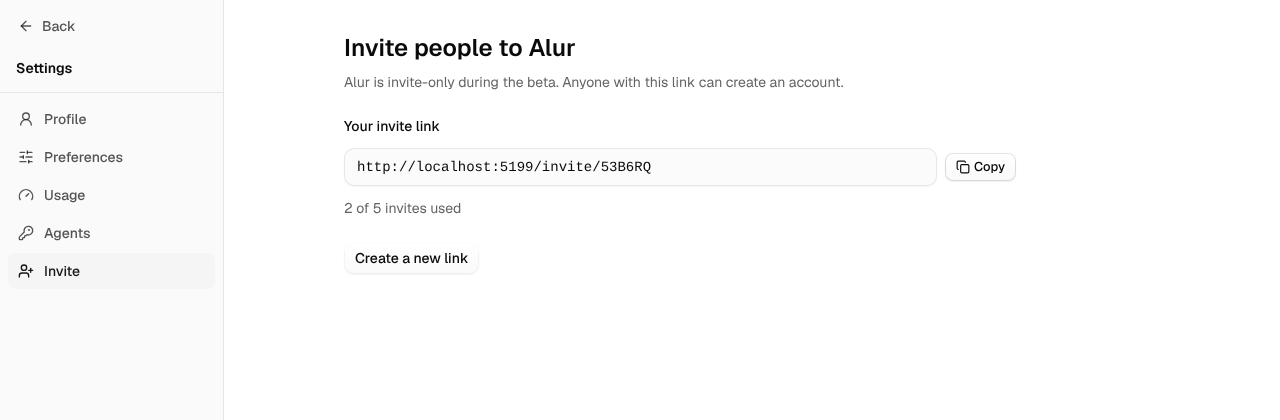
Alur is in private beta, so new accounts can only be created through an invite. Every account has its own invite link: anyone who opens it can create an Alur account of their own, with their own workspace. Inviting someone does not give them access to your workflows, tables or bookings.
Share your link
- Open Settings → Invite.
- Click Copy next to your invite link.
- Send the link to the person you want to invite.
The person who opens the link sees "Your name invited you to Alur" on the sign-up page. They can sign up with email and password (then confirm their email) or with Google. The link is remembered in their browser for 7 days, so they can come back to it.
How many people you can invite
Each account can bring in 5 people during the beta. The Invite page shows how many invites you have used. An invite counts as used when the account is created, even if the person never confirms their email or later deletes the account. When all invites are used, your link stops working and the page says "You've used all your invites."
Create a new link
If you shared your link somewhere you didn't mean to, replace it:
- Open Settings → Invite.
- Click Create a new link, then Create new link to confirm.
Your old link stops working at once. Invites you have already used stay used.
When a link doesn't work
A visitor sees "This invite link is no longer valid." when the link was replaced, all its invites are used, the inviter's account was deleted, or the address is mistyped. The page never says which. Ask the person who shared it for a new link.