
Mayar payments
Send invoices with a payment link and start a workflow when a customer pays
Mayar is an Indonesian payment platform. Connect your Mayar account once as a Payment connection, then:
- add a Mayar step to create an invoice and send its payment link, and
- start a workflow with a Payment Trigger when Mayar reports that a customer paid.
Together they close the "send invoice, get paid, say thanks" part of a service business: one workflow creates the invoice and emails the link, another marks the row paid and sends a receipt.
Connect Mayar
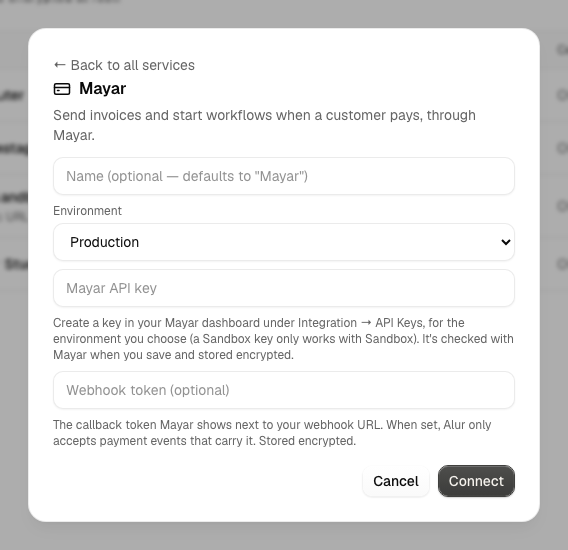
- In your Mayar dashboard, create an API key under Integration → API Keys. Mayar keys belong to one environment: a Sandbox key (from Mayar's test dashboard) only works with Sandbox, a live key only with Production.
- In Alur, open Connections → Add connection, choose the Payment tab, and enter a name, the environment and the key.
- Optionally, enter the webhook token (Mayar's callback token, shown next to the webhook URL in its dashboard). See Security.
- Alur checks the key with Mayar before saving it. If Mayar refuses it, you'll see the reason and nothing is saved. The key and the webhook token are encrypted at rest and never shown again.
Each Mayar connection gets its own webhook URL: Copy webhook URL under its name on the Connections page copies it, and the Payment Trigger step shows it in full. Paste it in Mayar's dashboard under Integration → Webhook so Mayar can tell Alur about payments. Mayar sends all events of your account to one URL, so if you already use a webhook URL elsewhere, decide which one Mayar should call.
Update key replaces the API key, the webhook token, or both; the webhook URL stays the same, so nothing changes in Mayar. Disconnect removes the connection: its steps fail at run time and its webhook URL stops working.
The Mayar step
- In the workflow editor, press +.
- Pick your Mayar connection (listed under Payment).
- Choose an action and fill in its fields.
Every field accepts {{ <stepId>.<path> }} expressions, like other
steps.
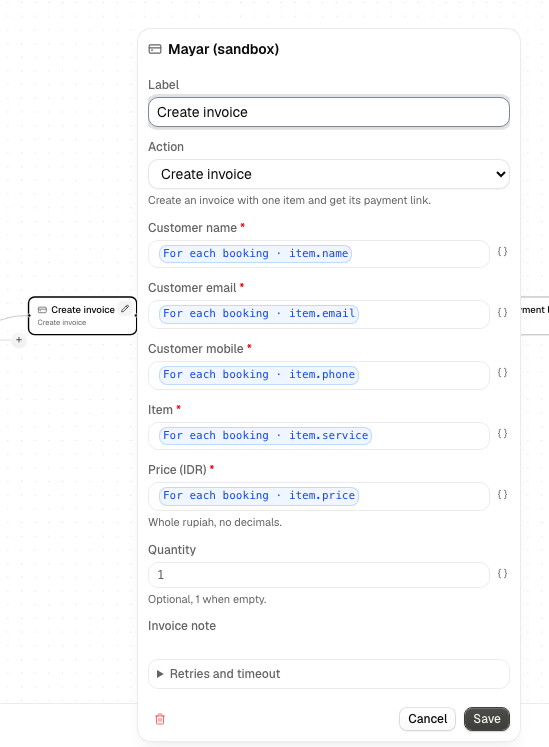
Create invoice
Creates an invoice with one item and returns its payment link.
| Field | Notes |
|---|---|
| Customer name | required |
| Customer email | required |
| Customer mobile | required, for example 081234567890 |
| Item | required; what the customer pays for |
| Price (IDR) | required; whole rupiah. 150000, 150.000 and 150,000 all mean Rp150.000 |
| Quantity | optional; 1 when empty |
| Invoice note | optional |
| Redirect URL | optional; where the customer goes after paying |
| Expires at | optional; a date and time such as 2030-01-31T17:00:00+07:00 |
Its output has id (the invoice ID), link (the payment link to send),
transactionId, expiredAt and body (Mayar's whole answer). For example, a
Resend step can email {{ invoice.link }}, and a
Database step can save {{ invoice.id }} on the
customer's row.
Get invoice
Reads an invoice. Enter the Invoice ID a Create invoice step returned. Its
output has id, status, amount and body. Use it to check an invoice
before acting on it.
Failures
A request Mayar refuses (a wrong key, a missing field, a key from the other environment) fails the step with Mayar's message, and the run shows it. A price or quantity that isn't a positive whole number fails before anything is sent.
Create invoice is never retried automatically. Mayar offers no way to tell a retry from a new invoice, so a retry could bill your customer twice. If the step fails because Mayar couldn't be reached, check your Mayar dashboard before running the workflow again. Get invoice retries temporary problems (timeouts, rate limits, server errors) by itself.
The Payment Trigger
Starts a workflow each time Mayar reports a payment on a connection.
- Create a workflow with Payment Trigger (or add it to an empty canvas).
- Open the step and choose the Mayar connection.
- Check that the webhook URL the step shows is the one in Mayar's dashboard.
Several workflows can listen to the same connection, and each one runs.
Later steps can use these values, for example {{ trigger.customerEmail }}:
| Value | What it is |
|---|---|
event |
payment.received |
id, status, amount |
The payment, as Mayar sends them |
customerName, customerEmail, customerMobile |
The customer |
productId, productName |
What was paid for |
data |
Everything Mayar sent about the payment, for example {{ trigger.data.transactionId }} |
A value Mayar didn't send is empty. Open a payment run to see exactly what Mayar
sent in data.
Test run sends a made-up payment; nothing is charged. Like the other triggers, an unpublished or turned-off workflow is skipped. The same payment delivered twice starts the workflow once. Mayar's other events (reminders, shipping, memberships) are accepted but start nothing yet.
Security
Anyone who knows a connection's webhook URL could pretend to be Mayar. Keep it private, and set the webhook token: Alur then only accepts events that carry Mayar's callback token and refuses the rest, which you can see in Mayar's webhook history. Before you deliver something valuable, use Get invoice to confirm the invoice is paid and the amount is right.
Not yet supported
Several items per invoice, tax and discount lines, refunds, payment links, products, memberships and Mayar's other events. Mayar is the only Payment provider for now.