
AI Image
Generate an image from a prompt and save it to your Media library
The AI Image step sends a prompt to an AI image model and saves the picture it creates in your Media library. A later step can use it, for example a Posting step that publishes it. You use your own account with an AI provider, so you pay the provider directly and choose any image model it offers.
Connect an AI provider
AI Image uses the same OpenAI-compatible connection as
AI Text (OpenAI, OpenRouter, or another server that speaks the
OpenAI API). When you add the connection, you can fill the optional Default
image model, for example gpt-image-1 on OpenAI or an image model ID from
OpenRouter's model list. AI Image steps use it unless they pick another model.
Leave it empty if you only use AI Text, or pick a model in each AI Image step.
Not every provider offers image generation. If your server has no image models, the step fails with the provider's message.
Add the AI Image step
- In the workflow editor, press +.
- Pick AI Image (under AI). It starts with one of your AI connections selected; the step's form lets you choose another.
- Fill in the fields below.
Every field accepts {{ <stepId>.<path> }} expressions, like other
steps.
| Field | Notes |
|---|---|
| Connection | required; the provider this step calls |
| Prompt | required; describe the image, usually with data from earlier steps |
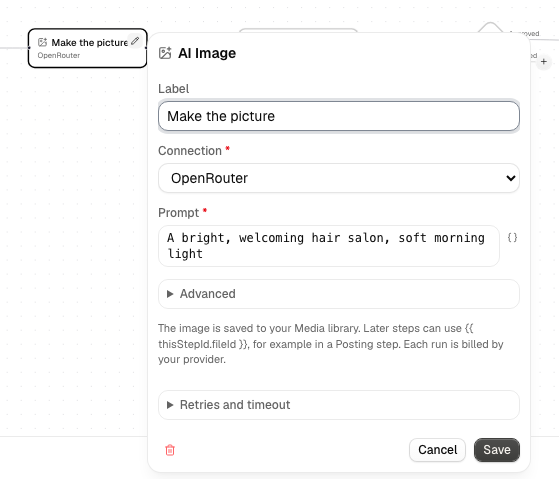
Under Advanced (collapsed), all optional:
| Field | Notes |
|---|---|
| Model | empty uses the connection's default image model |
| Size | for example 1024x1024. Empty uses the provider's default. Allowed values depend on the model |
| Quality | for example low, medium or high. Empty uses the provider's default. Allowed values depend on the model |
Each run creates one image.
Output and failures
On success the image is a new file in your Media library and the step's output has:
fileId: the file's ID, for example{{ step1.fileId }}. Use it in a Posting step under Images from an expressionmediaType: for exampleimage/pngname: the file name Alur gave it, likeai-image-1a2b3c4d.pngsize: the file size in bytesmodel: the model that was requested
A request that is rejected (a bad key, an unknown model, a prompt the provider refuses, no credit left), a reply with no image, or an image over the Media limit of 25 MB fails the step with a clear message, and the run shows it. Alur does not retry these, because each attempt would be billed. A request that takes longer than two minutes also fails without a retry: the provider may still finish and bill the image. Only a rate limit (HTTP 429) and network errors are retried automatically.
Alur does not guarantee that a call is made exactly once if something fails mid-way, and every image is billed by your provider, usually at a higher price than text. In a For each loop each item generates its own image, so a long list costs one image per item; the step's form shows a warning when it sits inside a For each.
Delete generated images you no longer need from Media.