

Zernio
Post to social media and reply to comments from a workflow
Zernio publishes to many social platforms (Instagram, Facebook, X, LinkedIn and more) through one account. Connect your Zernio account once in Alur, then add a Zernio step to publish posts or answer comments from any workflow.
Connect Zernio
- Create an API key in your Zernio dashboard under API keys. It starts
with
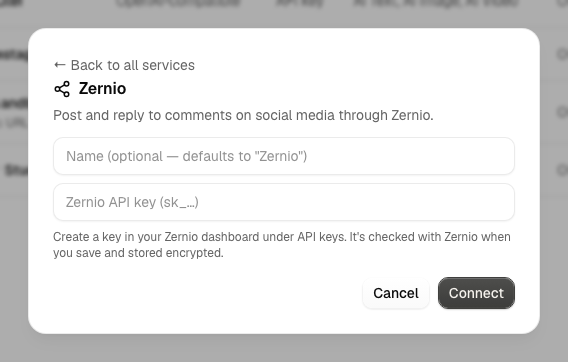
sk_. - In Alur, open Connections → Add connection, choose the Zernio tab, and enter a name and the key.
- Alur checks the key with Zernio before saving it. If Zernio rejects it, you'll see the reason and nothing is saved. The key is encrypted at rest and never shown again.
Rotate a key or disconnect
- Open Connections and find the connection.
- Choose Update key to rotate the key, or Disconnect to remove it.
Steps keep working after Update key, because they point at the connection and not at the key. Disconnect removes the connection; any Zernio step still using it fails at run time.
The Zernio step
In the workflow editor, press + and pick your Zernio connection (listed
under Connection). Choose an Action, then fill in its fields. Every
field accepts {{ <stepId>.<path> }} expressions, like other
steps.
For Account, pick one of your connected social accounts from the list. To use a value from an earlier step instead, choose Use an expression. If the list can't be loaded, the field switches to an expression field and tells you why.
Post
Publishes a post to one connected account.
| Field | Notes |
|---|---|
| Account | required; one social account |
| Content | required; the post text |
| Media URLs | optional; one public image or video URL per line. Some platforms (Instagram, TikTok) require media |
| Publish now | on by default. Off saves the post as a draft in Zernio |
Reply to comment
Replies to a comment on one of your posts.
| Field | Notes |
|---|---|
| Account | required |
| Post ID | required; the Zernio post ID the comment is on |
| Comment ID | optional; leave empty to reply to the post itself |
| Message | required; the reply text |
Output and failures
On success the step's output has status, ok and body (Zernio's
response), like API Call. For example,
{{ step1.body.post._id }} is the new post's ID.
Unlike API Call, a rejected request fails the step: a bad key, a platform rule, or duplicate content makes the step fail with Zernio's message, and the run shows it. Temporary problems (Zernio timing out, rate limits, server errors) are retried automatically.
Each Post and Reply sends an idempotency key derived from the run and step, so a retried step doesn't publish twice. Zernio rejects identical content posted to the same account within 24 hours, so a second identical post in a different run fails with Zernio's duplicate message rather than posting again.