

Posting
Publish text and images to social media from a workflow
The Posting step publishes a post, with text and images, to one or more social accounts. It needs a connection to a posting service, which you add once on the Connections page (currently Zernio).
Add a Posting step
- In the workflow editor, press +.
- Pick Posting (under Social).
- If you have more than one connection, choose which one the step uses under Connection.
- Fill in the fields below.
Every field accepts {{ <stepId>.<path> }} expressions, like other
steps.
| Field | Notes |
|---|---|
| Accounts | required; tick one or more connected social accounts. Use an expression to take account IDs (comma-separated) from an earlier step. If the list can't be loaded, the field becomes an expression field and tells you why |
| Text | the post text. Optional if you attach at least one image |
| Images | Choose images… opens a picker: select images from your Media library (search by file name, Load more for older ones) or Upload new ones, which are selected right away. Click Done, and click a thumbnail in the step to remove it |
| Images from an expression | Images from an expression under the picker takes file IDs from an earlier step instead, for example a Media column of a Database row: {{ <stepId>.row.media }}. Pick from library switches back |
| Image URLs | optional; one public image or video URL per line. Some platforms (Instagram, TikTok) require an image |
| Publish now | on by default. Off saves a draft instead of publishing |
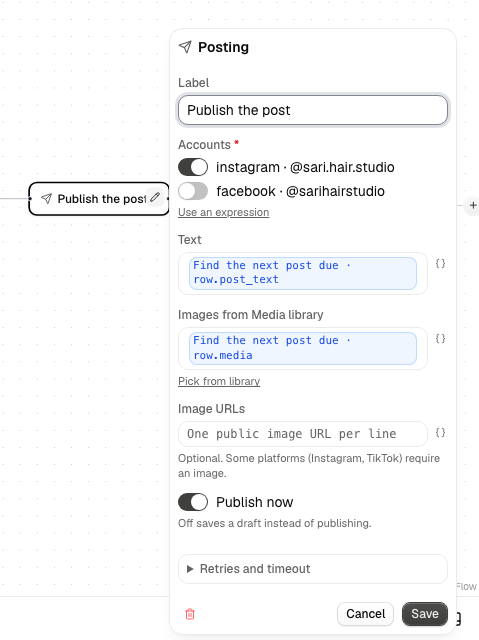
One post goes to every selected account. Library images are private, so when the step runs Alur uploads them and attaches them to the post.
Output and failures
On success the output has status, ok and body (the service's response).
The step fails, with a message, when no account is selected, when there is neither text nor an image, when an account isn't on the connection, when a selected image was deleted from your Media library, or when the service rejects the post (a bad key, a platform rule, duplicate content, or a post that only partly published). Temporary problems (timeouts, rate limits, server errors) are retried, and a retried step doesn't publish twice.