

Send Email
Send an email from a workflow through one of your email connections
The Send Email step sends one email each time it runs. It sends through an email connection; today that is a Resend connection, which sends from a domain you have verified with Resend.
Add the step
- Connect Resend once on the Connections page.
- In the workflow editor, press + and pick Send Email (under Email).
- Open the step and choose the Connection to send with. The first one is already selected; with several connections, pick the one whose domain you want to send from.
- Fill in the email, then Save.
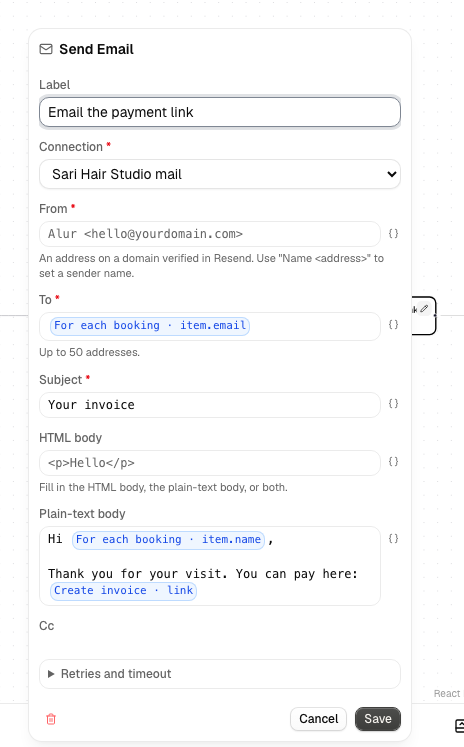
Without a Resend connection the step can still be added, but its form asks you to connect one first. If the chosen connection is later disconnected, the form says so; pick another connection and save. The fields you filled in are kept.
Fields
Every field accepts {{ <stepId>.<path> }} expressions, like other
steps.
| Field | Notes |
|---|---|
| Connection | required; one of your Resend connections |
| From | required; an address on a domain verified in Resend. Alur <hi@yourdomain.com> sets a sender name |
| To | required; up to 50 addresses, one per line or separated by commas |
| Subject | required |
| HTML body | the email as HTML |
| Plain-text body | the email as plain text |
| Cc, Bcc, Reply-to | optional; one or more addresses |
Fill in the HTML body, the plain-text body, or both. A step with neither fails before anything is sent.
Every address in To receives the same email and can see the other recipients. To send one email per person, put the step inside a For each.
Output and failures
On success the step's output has status, ok and body (Resend's
response), like API Call. {{ step1.body.id }} is the
email's ID in Resend.
Unlike API Call, a rejected request fails the step: an invalid key, an unverified sending domain, an invalid address or a used-up daily or monthly quota makes the step fail with Resend's message, and the run shows it. Temporary problems (Resend timing out, the per-second rate limit, server errors) are retried automatically.
Each send carries an idempotency key derived from the run and step, so a retried step doesn't send the same email twice. A new run sends again.