

For each step
Repeat steps once for every item in a list
The For each step repeats the steps you connect to it once for every item in a list: email each person from a Database search, update every row it found, or handle every item a webhook sent.
Repeat steps for a list
- In the workflow editor, press + and pick For each.
- Under List to repeat over, enter an expression that gives a list.
- Connect the steps that should run for every item to Each item.
- Connect the steps that should run once, after the last item, to Done.
- Click Test run to check it. See Seeing what happened.
How it works
For each has two handles on its right side:
- Each item — connect the steps that should run for every item. They run one item at a time, in the order of the list, and each item finishes before the next one starts.
- Done — connect the steps that should run once, after the last item.
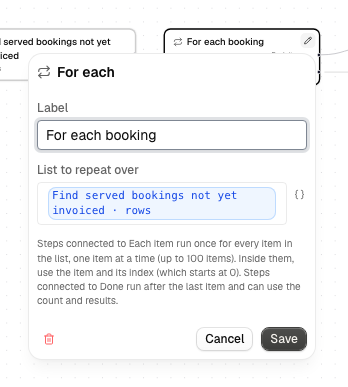
The steps connected to Each item (and anything after them) are the loop body.
| Field | Notes |
|---|---|
| List to repeat over | An expression that gives a list, such as {{ <stepId>.rows }} (the rows a Database Find rows step found) or {{ trigger.items }} (a list in a webhook's JSON body). You can't type a list in directly. |
The editor's test-run prompt only takes text, numbers and true/false, so to test a loop, get the list from an earlier step, or send it to the workflow's webhook as JSON.
Using the current item
Inside the loop body, the For each step's output describes the item the loop is on:
| Variable | What it is |
|---|---|
{{ <stepId>.item }} |
The current item. When the list is a Database search, {{ <stepId>.item.full_name }} is that row's Full name column (the variable picker lists the columns). |
{{ <stepId>.index }} |
The position of the current item. It starts at 0: the first item is 0, the second is 1. |
{{ <stepId>.count }} |
How many items the list has. |
A step in the loop body can read the steps before it in the same item, as
usual ({{ <otherStepId>.status }}), but only for its own item: item 2 never
sees what item 1 produced.
After the loop
Steps connected to Done can read:
| Variable | What it is |
|---|---|
{{ <stepId>.count }} |
How many items were processed. |
{{ <stepId>.results }} |
One entry per item, in order. Each entry holds the output of every step in the loop body that ran for that item, by step ID. Steps that were skipped for an item (for example the other side of a Condition) are left out. |
To read one value, use its position and step: {{ <stepId>.results.0.<bodyStepId>.status }}
is the first item's status from that body step (positions start at 0 here too).
Steps after the loop can't read a body step's output directly
({{ <bodyStepId>.x }} is empty there); use results.
Empty lists and wrong input
- An empty list is fine: the steps on Each item are skipped, the steps
on Done run, and the run succeeds with a
countof 0. - Anything that isn't a list (text, a number, an object, or a value that doesn't exist) fails the step with "For each needs a list". It isn't retried, and nothing in the loop body runs.
Limits
- At most 100 items. A longer list fails the step with a message naming the limit, before any item runs. Nothing is cut off silently.
- At most 20 steps in the loop body.
- No For each inside another For each.
- At most one AI Video step in the loop body. Each item waits for its own video, one after another, so the loop is slow and costs one video per item.
- The loop body is closed. Steps outside the loop can't connect into it, and a step wired to both Each item and Done is rejected. Connect steps that should run afterwards to Done. The editor shows the problem and won't save the workflow until it's fixed.
resultscan't be too large. If it grows past about 1 MB, the step fails and asks you to have the steps inside return less. Nothing is truncated.
A Condition or a Delay is allowed inside the loop body. A Condition chooses its branch separately for every item. A Delay pauses before the current item continues, and the next item starts only after it.
If an item fails
If a step fails on an item (after its usual retries), the run fails. The items after it don't run, and the items before it aren't undone: emails already sent stay sent. Each item runs its own steps, so an email or post step sends once per item.
Seeing what happened
On a run's page, the For each step shows each item as Item 3 of 10 with its own status, collapsed. Open an item to see its steps' input and output. While a test run is in progress, the step on the canvas shows which item the loop is on, for example 3 / 10.