

AI Video
Generate a short video from a prompt and save it to your Media library
The AI Video step sends a prompt to an AI video model, waits for the provider to finish, and saves the video it creates in your Media library. You use your own account with a provider, so you pay the provider directly and choose any video model it offers. Videos take minutes, not seconds, and usually cost much more than text or images.
Generated videos are saved to Media, where you can download them. The Posting step can't publish a video yet, only images.
Connect a video provider
Two kinds of connection work with AI Video. Open Connections → Add connection:
- OpenAI-compatible: use OpenRouter (
https://openrouter.ai/api/v1) and fill the optional Default video model, for examplegoogle/veo-3.1. OpenAI's own video API has been shut down, so other servers only work if they offer the same/videosAPI as OpenRouter; otherwise the step fails with the server's message. - Higgsfield: enter your API key ID and API key secret from your
Higgsfield account, and optionally a Default video model, which is a
Higgsfield endpoint path such as
wan/v2.7/text-to-video. Alur can't check the key with Higgsfield when you save, so a wrong key shows up the first time a step runs. Both parts are stored encrypted and never shown again. Update key replaces both parts without breaking steps. - HeyGen: enter your HeyGen API key. The prompt goes to HeyGen's Video Agent, which picks the avatar, voice and length itself, so write what the video should say and show in the prompt. Videos use your HeyGen credits. Alur can't check the key when you save, so a wrong key shows up the first time a step runs. Stored encrypted and never shown again.
Add the AI Video step
- In the workflow editor, press +.
- Pick AI Video (under AI). It starts with one of your video-capable connections selected; the step's form lets you choose another.
- Fill in the fields below.
Every field accepts {{ <stepId>.<path> }} expressions, like other
steps.
| Field | Notes |
|---|---|
| Connection | required; the provider this step calls |
| Prompt | required; describe the video, usually with data from earlier steps |
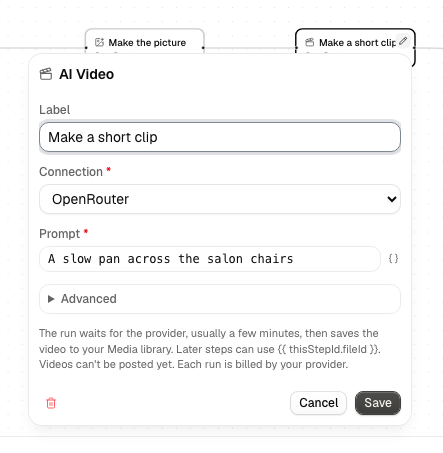
Under Advanced (collapsed), all optional:
| Field | Notes |
|---|---|
| Model | empty uses the connection's default video model. For Higgsfield this is the endpoint path |
| Seconds | the length, a whole number. Empty uses the provider's default |
| Resolution | for example 720p or 1080p. Empty uses the provider's default |
| Aspect ratio | for example 16:9 or 9:16. Empty uses the provider's default |
HeyGen uses only the prompt and an Aspect ratio of 16:9 or 9:16; a Model,
Seconds or Resolution value fails the step with a message.
Anything you leave empty is not sent. Allowed values depend on the model. Each run creates one video.
How waiting works
After the request is accepted, the run shows the step as running while the provider works. Alur asks the provider to call it back when the video is ready, so a finished video is usually picked up at once. Alur also checks the provider's status after 30 seconds, then a minute, then every two minutes, so a missing callback only means a slower result. The wait survives restarts and doesn't use your workflow's other steps.
If the video isn't ready after about 20 minutes, the step fails and the message includes the provider's job ID. The provider may still finish and bill that video; Alur just stops waiting.
Output and failures
On success the video is a new file in your Media library and the step's output has:
fileId: the file's ID, for example{{ step1.fileId }}mediaType: for examplevideo/mp4name: the file name Alur gave it, likeai-video-1a2b3c4d.mp4size: the file size in bytesmodel: the model that was requestedjobId: the provider's job ID
A request that is rejected (a bad key, an unknown model, no credit left), a job the provider reports as failed or refuses (for example a content policy), a finished job with no video, or a video over the Media limit of 25 MB fails the step with a clear message, and the run shows it. Alur does not retry these, because each attempt would be billed. Only a rate limit (HTTP 429) and network errors are retried when the request is submitted, and a provider that is briefly unavailable just means another status check.
Alur does not guarantee that a request is made exactly once if something fails mid-way, and every video is billed by your provider. In a For each loop each item generates its own video, one after another, so a long list takes a long time and costs one video per item; the step's form shows a warning when it sits inside a For each, and a loop can hold only one AI Video step.
Delete generated videos you no longer need from Media.