

Scheduling step
Read your bookings in a workflow, for example to remind people the day before
The Scheduling step reads your bookings so later steps can use them: remind everyone who is booked tomorrow, list the day's appointments, or check whether someone has already booked. It only reads; it never changes a booking. To act on each booking, follow it with a For each step.
Add a Scheduling step
- In the workflow editor, press +.
- Pick Scheduling under Scheduling.
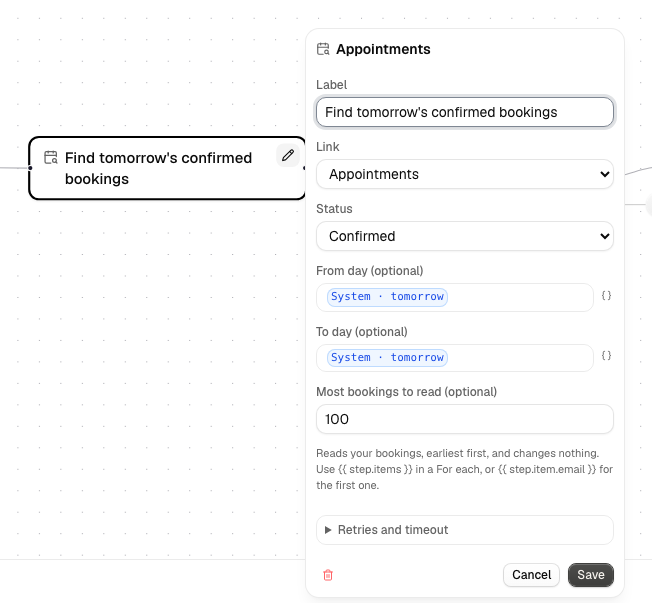
- Choose what to read:
| Field | What it does |
|---|---|
| Link | One of your links, or All links (the default). |
| Status | Confirmed (the default), Cancelled or Any. |
| From day, To day | Optional days, written YYYY-MM-DD or as an expression such as {{ system.tomorrow }}. Both days are included, as whole days in the workflow's time zone. Leave empty for no limit. |
| Most bookings to read | From 1 to 200 (50 if empty). |
The time zone is the one of the workflow's Cron trigger;
workflows without one use UTC, the same as {{ system.today }}. An empty
From day or To day (for example an expression that found nothing) means
no limit, so check your expression if the step returns more than you expect.
Bookings come back soonest first.
Using the bookings in later steps
The step returns count, items (the list) and item (the first booking, or
nothing). Each booking has these values:
| Value | What it is |
|---|---|
bookingId |
The booking's id |
pageId, pageTitle |
The link |
name, email, note |
What the booker entered |
status |
confirmed or cancelled |
start, end |
The booking time, as UTC (2030-01-15T10:00:00Z) |
timeZone, location |
The link's time zone and location text |
manageUrl |
The booker's cancel/reschedule link (empty for bookings you added by hand) |
callUrl |
The booking's video call link: Alur video call, else Google Meet, else empty |
In a For each step, set the list to {{ scheduling.items }} (use your step's
name) and refer to each booking as {{ each.item.email }}, {{ each.item.name }}
and so on. An empty result is not an error: count is 0 and a For each over it
simply does nothing.
Example: remind tomorrow's bookings
A Cron trigger every day at 17:00 in your time zone, a Scheduling step with
From day and To day both {{ system.tomorrow }} and Status Confirmed, a
For each over {{ scheduling.items }}, and inside it a
Send Email step to {{ each.item.email }}. The
Service business template includes this.
Good to know
- The step only reads your bookings. A link that isn't yours, or was deleted, fails the step with a message.
- It reads the bookings as they are when the step runs, not when the workflow was published.
- Reading is safe to repeat, so a retry never changes anything.