

AI Text
Generate or transform text with an AI model in a workflow
The AI Text step sends a prompt to an AI model and returns the text it writes: a summary, a reply draft, a translation, a classification. You use your own account with an AI provider, so you pay the provider directly and choose any model it offers.
Connect an AI provider
Open Connections → Add connection and choose the OpenAI-compatible tab. It works with OpenAI itself and with any server that speaks the OpenAI API: OpenRouter, Groq, Together, or a model you host.
| Field | Notes |
|---|---|
| Name | optional |
| Base URL | OpenAI: https://api.openai.com/v1. OpenRouter: https://openrouter.ai/api/v1. The server must be reachable over HTTPS from the internet; local and private addresses are refused |
| Default model | the model AI Text steps use unless they pick another, for example gpt-4o-mini on OpenAI or openai/gpt-4o-mini on OpenRouter |
| Default image model | optional; only for AI Image steps, for example gpt-image-1 |
| Default video model | optional; only for AI Video steps, for example google/veo-3.1 on OpenRouter |
| API key | your key for that provider |
Alur checks the key with the provider before saving it. If it is rejected you'll see the reason and nothing is saved. The key is encrypted at rest and never shown again. Update key replaces it without breaking steps, and Disconnect removes the connection; an AI Text step still using it fails at run time.
Add the AI Text step
- In the workflow editor, press +.
- Pick AI Text (under AI). It starts with one of your AI connections selected; the step's form lets you choose another.
- Fill in the fields below.
Every field accepts {{ <stepId>.<path> }} expressions, like other
steps.
| Field | Notes |
|---|---|
| Connection | required; the provider this step calls |
| Prompt | required; what you want, usually with data from earlier steps |
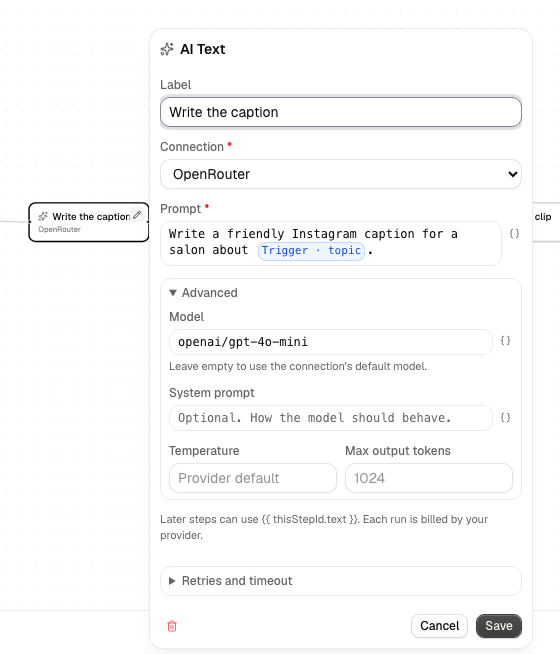
Under Advanced (collapsed), all optional:
| Field | Notes |
|---|---|
| Model | empty uses the connection's default model |
| System prompt | how the model should behave. Empty sends none |
| Temperature | 0 to 2; lower is more predictable. Empty uses the provider's default |
| Max output tokens | caps the length of the reply. Empty uses 1024 |
Output and failures
On success the step's output has:
text: the model's reply, for example{{ step1.text }}model: the model that answeredusage:promptTokens,completionTokensandtotalTokens, when the provider reports them
A request that is rejected (a bad key, an unknown model, no credit left) or a reply with no text fails the step with the provider's message, and the run shows it. Alur does not retry these, because each attempt would be billed. Only a rate limit (HTTP 429) and network errors are retried automatically.
Alur does not guarantee that a call is made exactly once if something fails mid-way, and every call is billed by your provider. In a For each loop, each item makes its own call, so a long list costs one request per item.